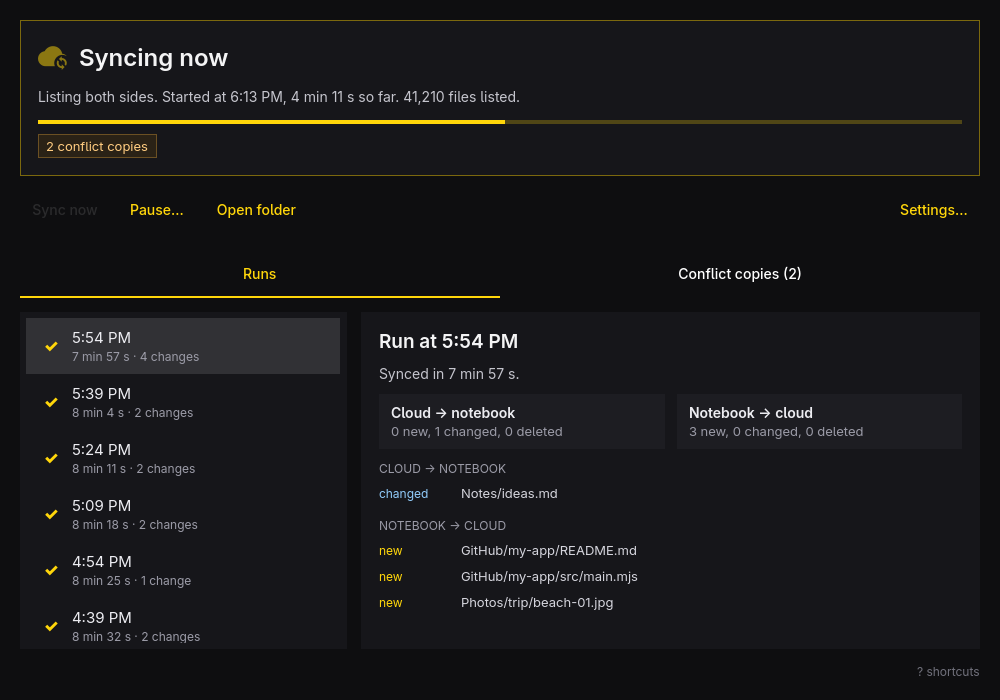
What it does
- Status: in sync, syncing now, paused, or failed with its cause and how to recover.
- Runs and conflicts: what each run changed in the cloud and on the computer, file by file, and the conflict copies left when a file changed on both sides.
- Bar widget and notifications: a cloud on the Omarchy bar with the same state, and a desktop notification when a run fails and when it works again.
- Controls: sync now, pause and resume, from the keyboard.
- Safety: it fixes a broken sync only after you confirm a dry run, and when too many files would be deleted it stops and shows you the list first.
Your Google account
To keep the folder and your Google Drive in sync, DriveSync asks Google for access to your whole Drive: it lists, downloads, uploads, changes and deletes files so that both copies stay the same. Your files travel only between your computer and Google. The developer runs no server and receives none of your data, and the app has no analytics.
Read the privacy policy for the details, and how to remove the access at any time.
Install
DriveSync runs on Omarchy (Arch Linux and Hyprland) and is built from its source:
git clone https://github.com/CaTeIM/drive-sync.git
cd drive-sync
bin/install
It builds the app, packages it and installs it with pacman. DriveSync then shows up in the Omarchy launcher. The source, the license (MIT) and the full manual are on GitHub.